Playwright Integration
Trigger Playwright test runs from workflow nodes with repository, script, artifact, and runner configuration built into the package.
npm install @playrunner/playwright @playrunner/githubRunner configuration panel
Default-exports playwrightIntegration and also exports
PlaywrightConfigPanel for repository selection, inline script editing, zip
upload metadata, environment injection, and runner resources.
GitHub-backed auth
Repository authentication uses GithubSettingsModal from
@playrunner/github, so both packages must be installed.
Workflow runner infrastructure
Playwright does not currently declare an Orchestrator contribution. Execution remains on the explicit host-managed Playwright runner path.
Package-owned icon
The Playwright SVG lives inside the package and is resolved by the frontend entrypoint.
Setup
- Install both
@playrunner/playwrightand@playrunner/githubas direct production dependencies of each consuming app. - Connect GitHub from Integrations by following the GitHub setup instructions.
- Add a Playwright node to the workflow canvas.
- Select the repository and branch containing the tests, then configure the test command or inline script and runner resources.
- Optionally connect an Environment node to inject environment variables into the test run.
- For authenticated tests, optionally select an authenticated profile after following the Authentication Profiles tutorial.
Authentication Profiles
The Authentication Profile setting restores a manually captured, encrypted browser session for a Local or Playrunner Cloud runner execution. The profile must be Authenticated, and the saved Environment assigned to that profile must be selected on an Environment node connected to the Playwright node. Playrunner Cloud users capture the state through a paired computer running the CLI authentication companion.
Authentication Profiles support owner-initiated Local runner and Playrunner Playrunner Cloud runner executions. They remain unavailable to shared workflow runs. See Reuse Browser Sessions with Authentication Profiles for profile creation, success conditions, session testing, lifecycle actions, security boundaries, and troubleshooting.
Suite sharding
Suite sharding distributes one Playwright node across separate runner instances, then merges their results back into one workflow output. Sharding and blob-report merging currently require the TypeScript Playwright Test runtime.
The Suite sharding setting on the Playwright node has three modes:
- Off runs the suite once without a shard argument.
- Manual requests a specific shard count. Playrunner never creates more shards than the suite has shardable units and rejects a request that exceeds the runner backend's capacity.
- Auto discovers the suite first and treats the configured shard, CPU, memory, and worker values as maximums. Playrunner reduces them when the suite cannot use them or the runner backend cannot supply them.
How Auto chooses the shard count
Auto sharding starts a discovery runner and collects the suite with:
playwright test --list --reporter=json
Discovery records the test count, file count, project count, Playwright parallel mode, and source revision. It converts these into shardable units:
- With Playwright
fullyParallel: true, each test is a shardable unit. - Otherwise, each file and project combination is a shardable unit. Tests in the same file and project remain together.
Auto allows approximately four shardable units for every configured worker on a shard. The useful shard count is therefore:
ceil(shardable units / (maximum workers per shard * 4))
The actual shard count is the smallest of:
- The Maximum shards value on the node.
- The useful shard count calculated from discovery.
- The capacity currently offered by the runner backend.
For example, 12 fully parallel tests with one worker per shard produce three useful shards. Setting Maximum shards to eight still launches only three runners, provided the backend has capacity for all three:
ceil(12 / (1 * 4)) = 3 useful shards
min(8 configured, 3 useful, available capacity) = 3 shards
Capacity accounts for concurrent-runner, shard-count, aggregate CPU, aggregate memory, and aggregate worker limits. Local execution defaults to no more than four concurrent shards and also limits the plan to the CPU and memory visible to the local Orchestrator. A hosted runner backend can supply its own capacity limits.
How Auto chooses resources
In Auto mode, Maximum CPU per shard, Maximum memory per shard, and Maximum workers per shard are ceilings rather than guaranteed allocations. Playrunner jointly selects values that fit both those ceilings and the aggregate backend capacity.
On a first run, Playrunner uses discovery-based fallback sizing. It selects a feasible memory shape, limits workers to the available CPU, memory, and total worker capacity, and then selects the smallest feasible CPU shape that supports those workers.
Completed comparable runs improve subsequent plans. Playrunner considers up to 10 previous observations for the same workflow node. An observation is usable only when all blob reports were produced, the run completed, the Playwright parallel mode and project count match, and the previous suite contained between half and twice as many shardable units as the current suite.
When comparable history exists, Playrunner:
- Uses the previous allocated memory values to avoid returning immediately to the first-run maximum.
- Estimates duration by scaling the median previous duration for suite size and effective parallelism.
- If Target duration in minutes is configured, chooses the smallest CPU shape estimated to meet that target.
The expanded runtime plan in the workflow editor shows the selected shard count, workers and resources per shard, aggregate resources, discovery totals, history sample count, estimated duration when available, and whether the plan was limited by the configured maximum, suite size, or runner capacity.
Execution and report merging
After planning, Playrunner launches every shard runner concurrently. Each runner receives Playwright's native shard argument and produces a blob report:
playwright test --shard=1/3 --reporter=blob
playwright test --shard=2/3 --reporter=blob
playwright test --shard=3/3 --reporter=blob
Playrunner records a checksum, size, Playwright version, source revision, and shard index for every blob. Before aggregation it verifies that all shard indexes are present, no shard is duplicated, every report came from the same Playwright version, and each downloaded blob matches its recorded size and checksum.
A final aggregation runner merges the verified blobs into one HTML and JSON report:
playwright merge-reports --reporter=html,json
The Playwright node exposes that merged output to the rest of the workflow. If any shard fails, the node's final outcome is an error. When every shard still produces a valid blob report, Playrunner can merge the reports before returning that error so the combined failure details remain available.
The workflow canvas keeps discovery, each numbered shard, and report merging visible beneath the Playwright node. Expand the runtime plan to inspect the selected resources and the constraint that limited the plan. A failed shard marks the Playwright node as an error, while report merging can still succeed and preserve one combined report for diagnosis.
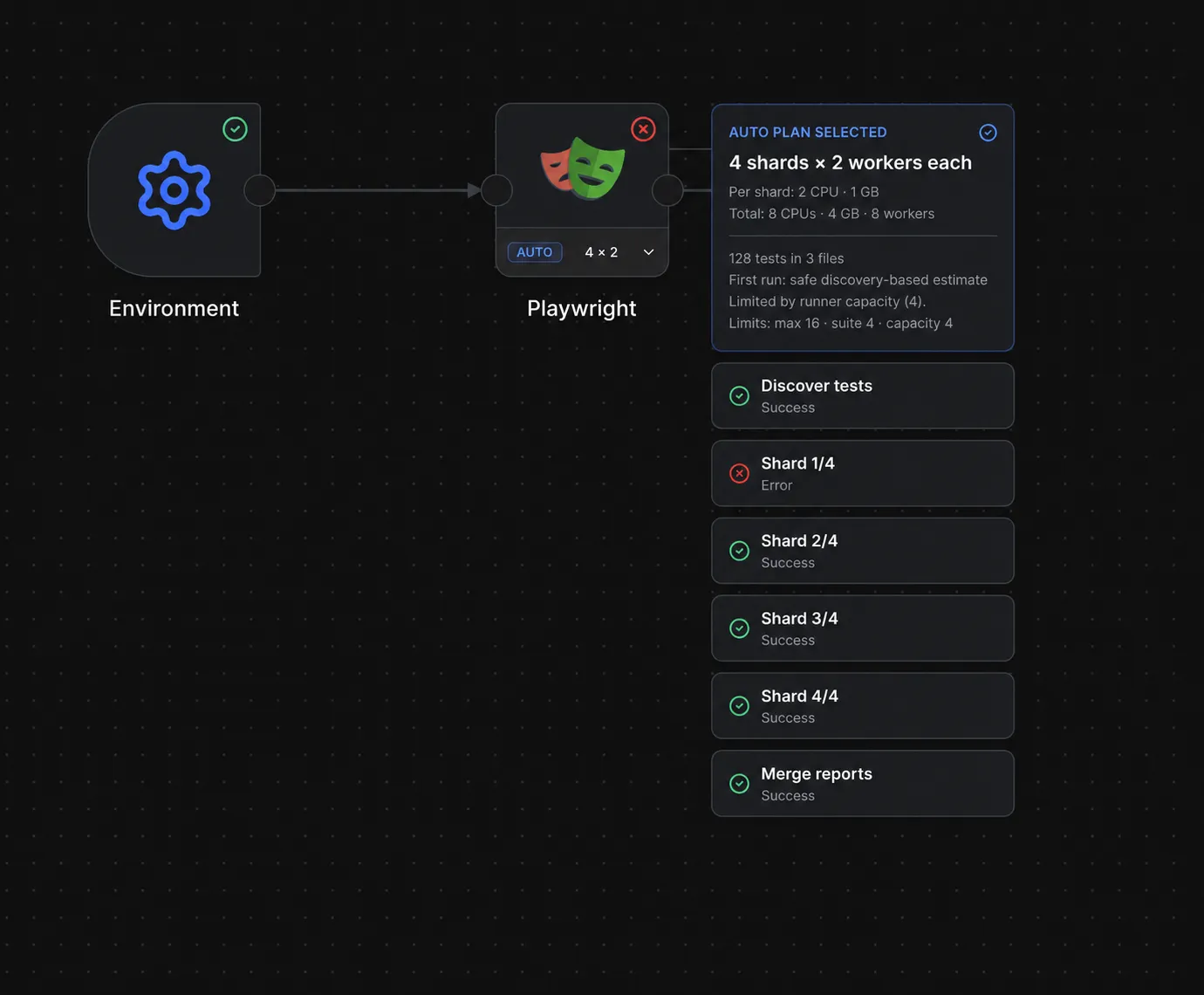
An Auto plan running four shards with two workers each. The failed first shard is still included in the successfully merged report.
Exports
import playwrightIntegration, {
  PlaywrightConfigPanel,
} from '@playrunner/playwright';
import playwrightApiContribution, {
  playwrightRouter,
} from '@playrunner/playwright/api';
The same contribution objects remain available as named exports. The default exports are the build-composition contract.
Frontend
The frontend entrypoint default-exports playwrightIntegration, which keeps the
existing integration id as playwright so saved workflows continue to resolve
their test runner nodes.
Playwright owns the configuration UI, including repository selection, inline script editing, zip upload metadata, environment variable injection, and runner resource settings.
When GitHub is connected, the panel uses the authenticated
GET /api/github/repositories and GET /api/github/branches routes. It uses
credentialStatus.configured to decide when discovery can start; it does not
read an access token from integration data.
Playwright keeps its input panel enabled, so it can receive inbound workflow context from nodes such as Environment even though its selector category is Trigger.
GitHub Dependency
Playwright repository authentication still uses GitHub. It imports
GithubSettingsModal from @playrunner/github and declares
@playrunner/github as a peer dependency. The consuming frontend must select
both packages as direct production dependencies. The build composer discovers
their package-owned metadata and generates static imports; neither package
requires a central registration entry.
During workspace development, both dependencies must resolve locally. Pointing
only @playrunner/github at packages/github leaves the published Playwright
configuration panel in the frontend bundle, so changes to repository discovery
will not appear.
API
The API entrypoint default-exports playwrightApiContribution, containing the
empty playwrightRouter and its /api/playwright mount path. The package
manifest declares the playwright ID plus its . frontend and ./api surfaces,
and both entrypoints default-export their contribution. Frontend and API builds
discover those surfaces from installed direct production dependencies and
generate static imports.
GitHub repository and branch discovery belongs to the GitHub package API at
/api/github; the Playwright API router remains empty.
Orchestrator
The Playwright package does not currently declare an ./orchestrator surface.
Its runner preparation and execution are explicit host-managed paths in
apps/runners/orchestrator. Installing the package therefore contributes its
frontend and API surfaces, while executable Playwright support still depends on
the host runtime already bundled into the Orchestrator image.
Assets
The Playwright SVG lives inside the package at packages/playwright/assets/playwright.svg. The frontend entrypoint resolves it with new URL(..., import.meta.url), so the app does not need a duplicate public asset.
See it in a workflow
This page is the package reference. For a complete workflow built on the canvas, start here: